

Mega Project Cashflow and Funding Strategy Masterplan Excel Dashboard
Mega Project Cashflow & Funding Strategy Excel Dashboard
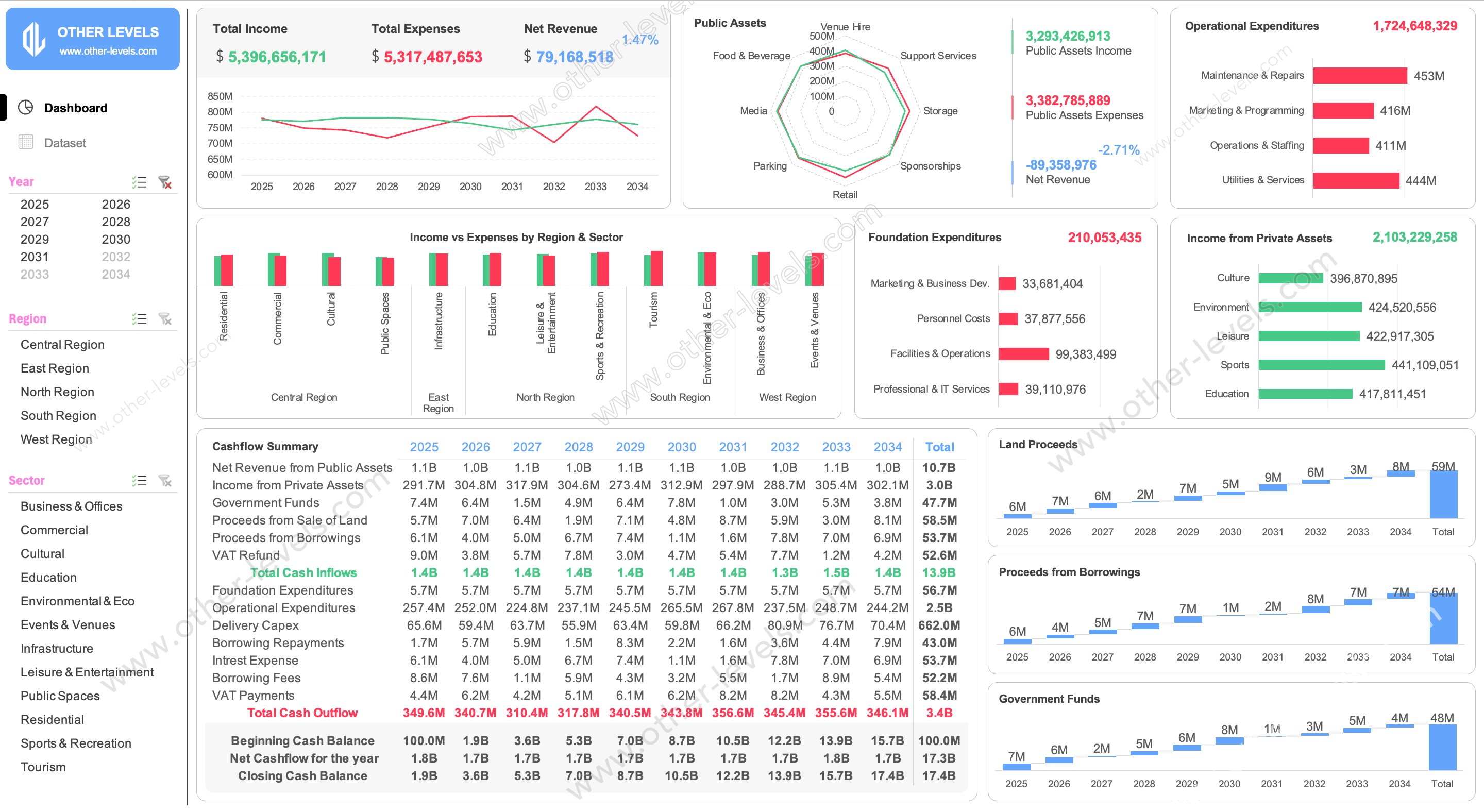
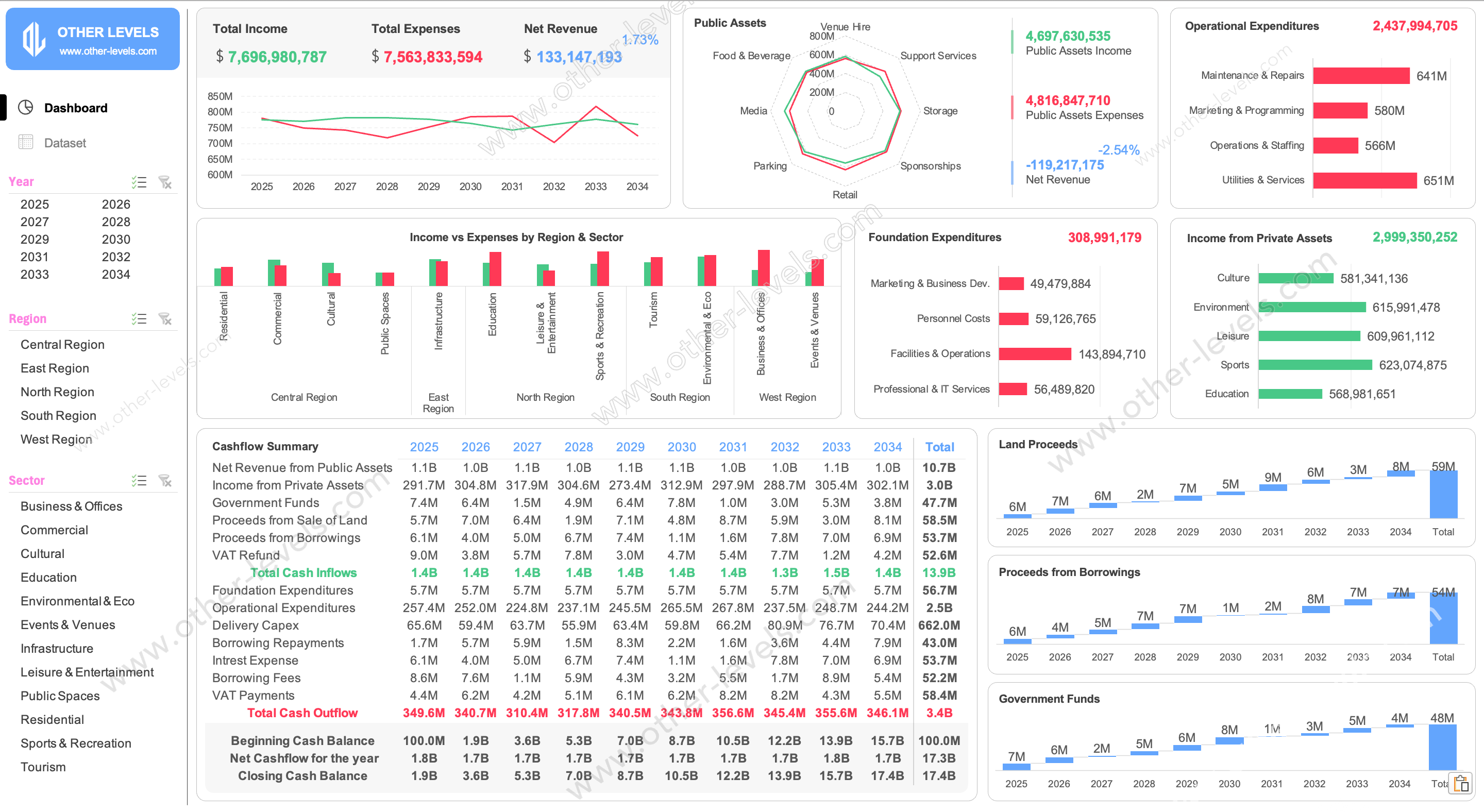
This Excel Dashboard is built for large masterplan projects where one slide must tell the whole story. In a single view, decision-makers can track income, expenses, funding sources, and closing cash balance for every year of the program. It works as a control room for long, complex investment plans.
Top KPIs and timeline at a glance
At the top, you see total income, total expenses, and net revenue with a clean time-series chart. You can scan trends by year and instantly judge overall financial performance without digging into raw tables. Global slicers for year, region, and sector keep every visual locked to the same selection.
- Track how income and expenses move over the full 10-year horizon.
- Compare results by region and sector in one consistent view.
- Use as a master control sheet during board or steering meetings.
Public and private assets performance
A radar chart shows how public-asset activities perform across venue hire, retail, media, and more, while bar charts break down private-asset income. This makes it easy to see which spending categories are driving growth and which ones need attention.
- Compare public assets income, expenses, and net contribution.
- Review private asset lines such as culture, sports, and education.
- Spot imbalances between operations, maintenance, and programming costs.
Cashflow summary, funding mix, and reports
The central table works like a live model in excel format for expense reports, summing all cash inflows and outflows by year. Foundation costs, operational costs, delivery capex, VAT, and debt service all roll into a clear net cashflow line. Column charts for government funds, land proceeds, and borrowings complete the funding picture.
- View year-by-year cashflow, from opening to closing balance.
- See how government funds, land sales, and debt share the load.
- Reuse it as a base for other Dashboard Templates across your portfolio.
Who will benefit from this dashboard
City planners, project finance teams, and consultants can use this Excel Dashboard to align stakeholders fast. Instead of flipping through many files, you walk into the room with one template that answers the key funding questions in minutes.
Related Excel dashboard templates
To build a full planning suite, you can pair this model with our forecast commit Excel dashboard with gross profit trajectory insights for forward-looking revenue planning, and our Excel project control dashboard template for tracking KPIs and capacity to manage execution and team workload across your projects.
Specifications
Get all essential details in one place. From features and package contents to software compatibility and skill level required, this section gives you a clear overview so you know exactly what to expect before download.
Template Features
Package Details
Software Compatibility
Skill Level Required
Intermediate
FAQs
Please read our FAQs page to find out more.
Are the templates fully customizable?
Yes, all our templates are fully customizable. You can adjust the layout, data, and design elements to fit your specific needs. Our templates are designed to be flexible, allowing you to easily tailor them to your preferences.
Can I order a product in any language?
Yes, we provide products in any language. Simply select the "Dashboard language change" Service and once your order is placed, you will receive it within 48 hours.
What happens if I choose the wrong monitor screen size for my dashboard?
If you choose the wrong screen size, the dashboard may not display correctly on your monitor. Elements could appear too large, too small, or misaligned, affecting the readability and usability of the dashboard. We recommend selecting the appropriate screen size to ensure optimal viewing and performance.
Do I need specific skills to use the advanced Excel dashboard templates?
Our advanced Excel dashboards are easy to use, the only thing you need to know is how to work with PivotTables. With basic knowledge of PivotTables, you'll be able to customize and fully utilize these templates effortlessly. "Please check the skill level required"
All dashboards are 100% editable Excel files. Learn how to use them through our video tutorials, included datasets, and lifetime access program.